


Qobuz: Music & Editorial
4.53.87K Reviews
App Specs
- Version
- Varies with Device
- Updated On
- License
- Free
- Downloads
- 1,000,000+
- Developer
- Qobuz
- Categories
- Music & Audio
- Platform
- Android, iOS
Screenshots
 Analysis by AppCompare
What keeps me interested in Qobuz: Music & Editorial is its emphasis on sound quality: it treats listening as more than a way to fill a quiet moment. That focus makes a difference if you enjoy sitting with an album, comparing recordings, or paying attention to details you might miss in a casual shuffle. It also shapes the main trade-off: the app is most compelling when you care about how music sounds, not simply about finding the cheapest or most hands-off way to play a song.
Why sound quality changes the listening experience
Qobuz is a music and audio app from Qobuz, with a free download and in-app purchases. Its central appeal is high-quality streaming and downloads across a catalog described as containing over 100 million tracks. In practice, a larger or more detailed audio file is not automatically a revelation on every phone speaker. I get more from that emphasis when I use headphones or audio equipment that can make subtle differences easier to hear, and when I give a track enough attention to notice them.
That distinction matters before choosing a service. If I am listening while crossing a busy street, cooking, or taking a quick call, the surroundings often matter more than fine sonic detail. On a quieter evening, the same recording can feel more involving when I sit down with it. I would treat high-resolution playback as a reason to explore, not a guarantee that every song will sound dramatically different on every setup.
A listening habit that suits the app
My most useful approach is to choose an album or artist I already know, then listen without constantly skipping. Familiar music gives me a reference point: I can focus on the arrangement, vocal texture, or the way instruments sit together instead of judging sound quality in the abstract. This is also a practical way to decide whether Qobuz’s audio emphasis matters to me personally before building it into my routine.
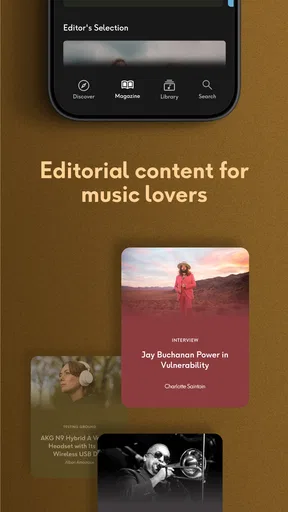
The editorial side gives that listening a second path. Rather than treating recommendations as a stream of tracks to accept or dismiss, I can use articles, interviews, and album reviews to learn why a release might be worth my time, then move from reading to listening. That works especially well when I want a deliberate discovery session instead of background music. I would not expect every editorial item to match my taste, but the combination gives me a reason to explore beyond the familiar suggestions that dominate many streaming apps.
Where Qobuz fits into a normal day
Imagine having a few minutes before leaving home and wanting to choose music for the trip. I can look for an album, save listening time for the commute by downloading it in advance, and avoid relying on a patchy connection once I am on the move. A useful habit is to do that while connected to a dependable network, then check that the chosen music is available offline before heading out. It is a small bit of preparation, but it avoids the frustration of discovering a connection problem after the journey has begun.
For a different kind of session, I might read about an artist, follow a recommendation, and queue a full record while relaxing at home. That slower workflow is where the app’s mix of listening and editorial material feels most distinctive to me. If I only want a quick playlist to soundtrack errands, another service with a more familiar recommendation routine may feel more direct. Qobuz makes more sense when I want to choose with some intention.
Worth Reading Before You Choose

EA SPORTS FC Mobile 26 Is a Bigger Football Game, but It Takes Time

Flipboard Shows What News Apps Must Do Beyond the Feed

Switching to Android Auto Means Rethinking Your Driving Routine

Google Calendar Makes a Crowded Week Easier to Manage

Ludo King Makes the Most of the Minutes Between Plans

Baby Panda World Brings Quick Play to Modern Phones, but Its Game Library Feels Busy
Trade-offs before making it your main player
Sound quality can bring practical compromises. Larger or higher-quality downloads can take more device storage, so I would be selective about which albums I keep offline rather than downloading everything I might someday play. If storage is tight, rotating downloads after a trip is more sensible than treating the phone as a permanent archive. Likewise, a strong connection and suitable listening gear can affect how much value I get from the app’s audio focus.
There is also a difference between a broad catalog and a perfect match for every listener. A huge selection is useful when I am exploring, but it does not make search or discovery automatically effortless. If I already know the album or track I want, search is the quickest route; if I do not, editorial picks can give me a more human-feeling starting point. I would compare that approach with services that foreground personalized mixes: those may be better when I want the app to do nearly all the choosing for me.
Qobuz has a 4.5 average from around 69,000 ratings, and it has passed one million installs. Its Teen age rating is worth noting for families considering who will use the app. For me, those details are context rather than a substitute for trying the listening style: the real question is whether I will use the sound-focused experience and editorial material often enough to make them part of my routine.
The Audiophile’s Dream
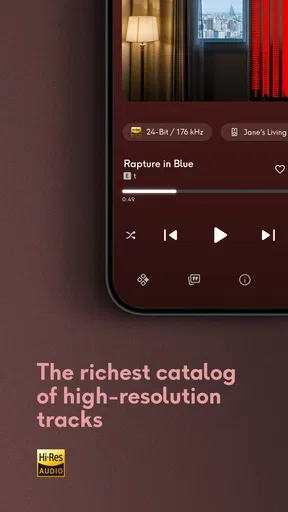
Alright, let’s dive right into what makes Qobuz stand out from the crowd. If you’re an audiophile, this app is basically a dream come true. We’re talking high-resolution audio streaming that feels like a warm hug for your ears. Imagine listening to your favorite tracks in Hi-Res quality; it’s like hearing them for the first time all over again. The clarity and depth are just phenomenal.
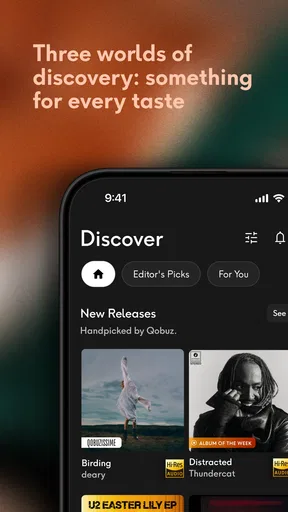
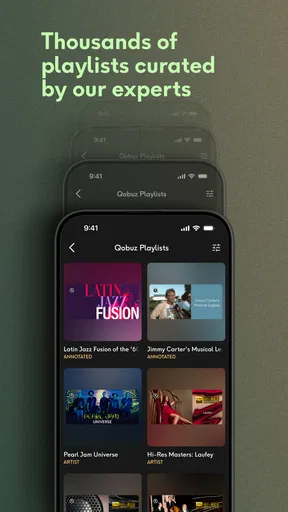
Qobuz offers a vast library of over 70 million tracks, which is no small feat. Whether you're into classical symphonies or the latest indie hits, there’s something for everyone. The app also provides a unique take on music discovery. Instead of just relying on algorithms, Qobuz has a team of editors curating playlists and recommendations. It’s like having a friend with impeccable taste guiding you through the musical landscape.
Interface and Usability
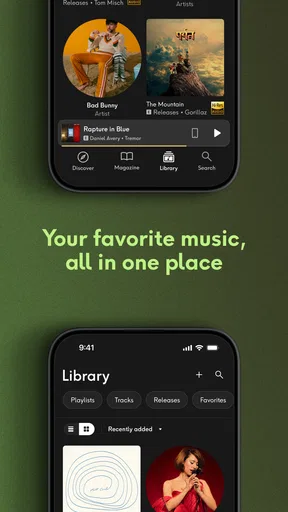
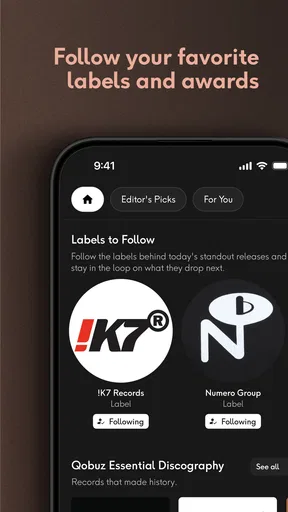
Now, let’s talk about how easy it is to use. The interface is sleek and doesn’t overwhelm you with options. Navigating through the app is a breeze, whether you’re on Android or iOS. The home screen gives you quick access to your favorite tracks, new releases, and curated playlists. Plus, the search function is pretty solid, helping you find that obscure track in no time.
One of the highlights for me was the editorial content. The app isn't just about streaming music; it's packed with articles, interviews, and album reviews. This adds a whole new layer to the experience, allowing you to dive deeper into the stories behind the music. It’s like having a mini music magazine right at your fingertips.
Offline Listening and Downloads
Let’s face it, we’re not always blessed with a stable internet connection. That’s where Qobuz’s offline listening feature comes in handy. You can easily download your favorite albums and playlists to enjoy them anytime, anywhere. The download process is straightforward, and the audio quality remains top-notch even when you’re offline. Perfect for those long commutes or when you’re out and about.
Let me add one practical detail to that routine: I think of offline listening as a temporary travel shelf, not a replacement for everything in my library. Before a journey, I would pick the albums I genuinely expect to hear and leave room for the phone to handle everyday tasks. This is particularly useful if I am going away from reliable Wi-Fi or expect a train ride with inconsistent reception. It also makes me more deliberate about what I want to hear instead of downloading a long list and spending the trip searching through it.
For anyone wondering whether downloads suit a daily commute, the answer depends on how predictable the trip is. If I listen to the same few records repeatedly, saving them ahead of time is convenient. If my tastes change every hour, streaming may feel less restrictive, provided the connection is dependable. I would test the offline workflow with one album first, confirm it plays without a connection, and then decide how much of the phone’s storage I want to devote to music.
Compatibility and Integration
Another cool thing about Qobuz is its wide range of compatibility. Whether you’re using a smartphone, tablet, or desktop, the app works seamlessly across devices. It also integrates with a variety of Hi-Fi equipment, so if you’ve got some fancy gear at home, you’re in for a treat.
That makes it easier to think of the service as part of a listening setup rather than only a phone app. If I use a dedicated home system, I can make the living-room session the place where I pay closer attention to sound; the phone remains useful for choosing music and taking it with me. I would still check how my own equipment connects before building a routine around it, since the benefit of integration depends on the gear I actually own. Someone listening mainly through a basic speaker may reasonably care more about reliable playback and easy controls than about a hi-fi setup.
Moreover, Qobuz supports a variety of audio formats, including FLAC and ALAC, ensuring that you’re getting the best possible sound quality. It’s clear that Qobuz is designed with true music enthusiasts in mind.
Subscription Plans
Let’s chat about the subscription plans. Qobuz offers different tiers, each catering to varying needs. The plans might be on the pricier side compared to other streaming services, but if high-quality audio is your priority, it’s definitely worth considering. Plus, their free trial gives you a taste of what’s in store without committing right away.
The app itself is free to download, while in-app purchases are listed at $15.29 per item, so I would distinguish installing it from deciding how I want to pay for continued listening. A free download is a low-effort way to inspect the interface and editorial material; the ongoing value depends on whether I will use the listening options enough to justify a paid tier. Before committing, I would compare the current plan choices and terms in the app with what I already use, rather than assume that high audio quality alone makes the extra expense worthwhile.
That comparison is most useful when I ask what I would give up by switching. If I rely on another service’s familiar playlists, social sharing, or automatic mixes, I should consider whether Qobuz’s editorial approach and sound focus would replace those habits or sit alongside them. For a listener who mainly wants songs playing with minimal decisions, a mainstream service built around personalized queues may be the better everyday fit. For someone who enjoys choosing albums and reading about artists, Qobuz has a clearer reason to earn a place in the rotation.
Overall, I’ve got to say, Qobuz is a fantastic choice for anyone serious about their music. With its high-resolution streaming, editorial content, and user-friendly interface, it’s a solid contender in the world of music apps. So, if you're ready to elevate your listening experience, give Qobuz a whirl!
Who I’d recommend it to
I would point Qobuz toward listeners who already make time for albums, care about sound, or enjoy learning about the people and choices behind a release. Classical listeners may appreciate having room to explore recordings, while indie fans can use editorial recommendations as a path into artists they have not tried. The strongest fit is not simply someone who owns expensive equipment; it is someone curious enough to listen closely and patient enough to choose music rather than expect an endless stream to make every decision.
I would be less quick to recommend it as a sole music app to someone who mostly wants casual background playback, needs the lowest possible ongoing cost, or prefers algorithmic mixes to browsing. It may also be a poor match for a listener with limited storage who depends heavily on offline music and wants to keep a very large collection downloaded at all times. Those needs do not make Qobuz a bad app; they just make its priorities less useful in that particular setup.
A final practical judgment
My advice is to try it with a familiar album and a listening setup you use often, then explore one editorial recommendation and one offline download. Those three small tests reveal more than judging the app by its catalog size alone: you can decide whether the sound focus is noticeable to you, whether the editorial material actually leads you somewhere new, and whether the download routine fits your commute or travel plans. Qobuz is at its best when those parts work together, not when it is treated as a checklist of premium features.
For me, the app earns consideration as a more intentional alternative to the usual all-purpose streaming experience. I would choose it when sound quality and music context matter, and choose a different option when convenience, an automatic soundtrack, or keeping costs down matters more. That is a fair trade, and it makes the decision clearer: Qobuz is worth exploring for engaged listeners, but nobody needs to pay for a listening style they will not use.
Pros
- High-quality audio streaming options.
- Extensive classical and jazz catalog.
- Curated editorial content available.
- Offline listening feature supported.
- User-friendly interface design.
Cons
- Higher subscription cost than rivals.
- Limited social sharing features.
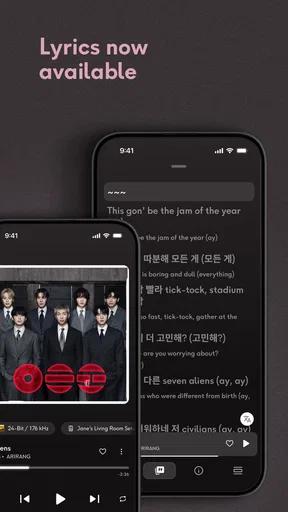
- No lyrics display during playback.
- Smaller music library than competitors.
- Desktop app can be resource-heavy.
FAQs for Qobuz: Music & Editorial
What is Qobuz: Music & Editorial, and how does it differ from other music streaming apps?
Qobuz: Music & Editorial is a high-resolution music streaming app offering a vast catalog of tracks in FLAC format, ensuring superior sound quality. Unlike other apps, Qobuz also provides rich editorial content, including artist interviews, album reviews, and curated playlists, allowing users to explore music more deeply. It caters especially to audiophiles seeking high-quality audio and insightful content.
Does Qobuz offer offline listening, and how can I download tracks for offline use?
Yes, Qobuz allows users to download tracks for offline listening. You can save individual songs, albums, or playlists by tapping the download icon. This feature is available for subscribers, enabling them to enjoy their music without an internet connection, perfect for traveling or areas with limited connectivity.
What subscription plans does Qobuz offer, and are there any free trials available?
Qobuz offers several subscription plans, including Studio Premier and Sublime+, each providing different levels of access and audio quality. They often provide a free trial period, allowing users to explore the app's features and sound quality before committing. It's best to check their website or app for the latest offers and plan details.
Is Qobuz compatible with various devices and platforms?
Qobuz is compatible with a wide range of devices and platforms, including Android, iOS, Windows, and macOS. Additionally, it supports various audio systems and integrations with third-party apps, making it versatile for users who wish to enjoy high-resolution audio across different setups. Ensure your device meets the app's system requirements for optimal performance.
How does Qobuz ensure high-quality sound, and what audio formats are used?
Qobuz ensures high-quality sound by offering music in FLAC format, which is lossless and maintains the original audio quality. They provide tracks at up to 24-bit/192 kHz, significantly enhancing the listening experience for audiophiles. This commitment to quality makes Qobuz stand out among other streaming services that typically offer compressed audio formats.


